Built for dental labs

From order to delivery, one flow.

LabSoft brings the lab, the clinic, the dentist, the technician and the courier onto one system. Digital ordering, production, delivery and billing, plus AI assistants that speak Turkish — on the web and on your phone.
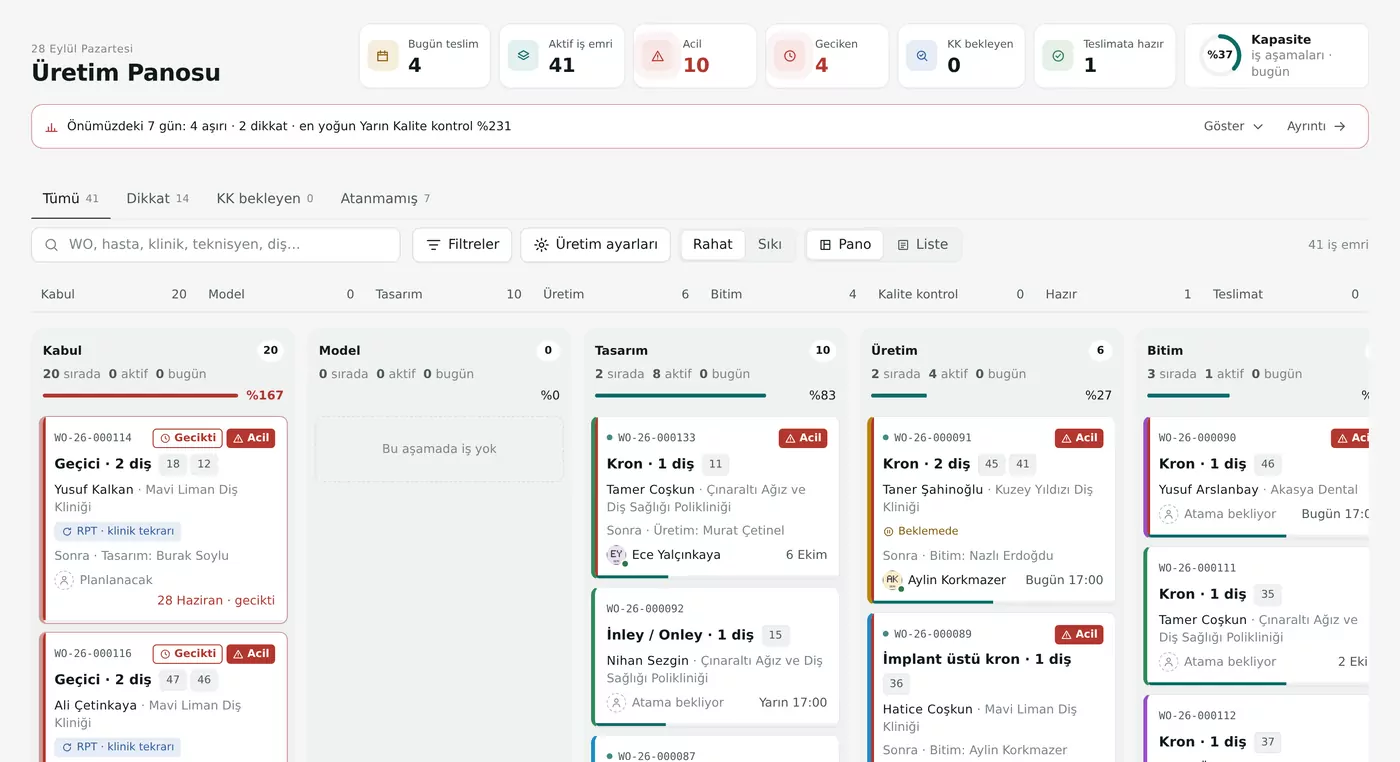
Production board: work orders in intake, design, production, finishing and quality control columns
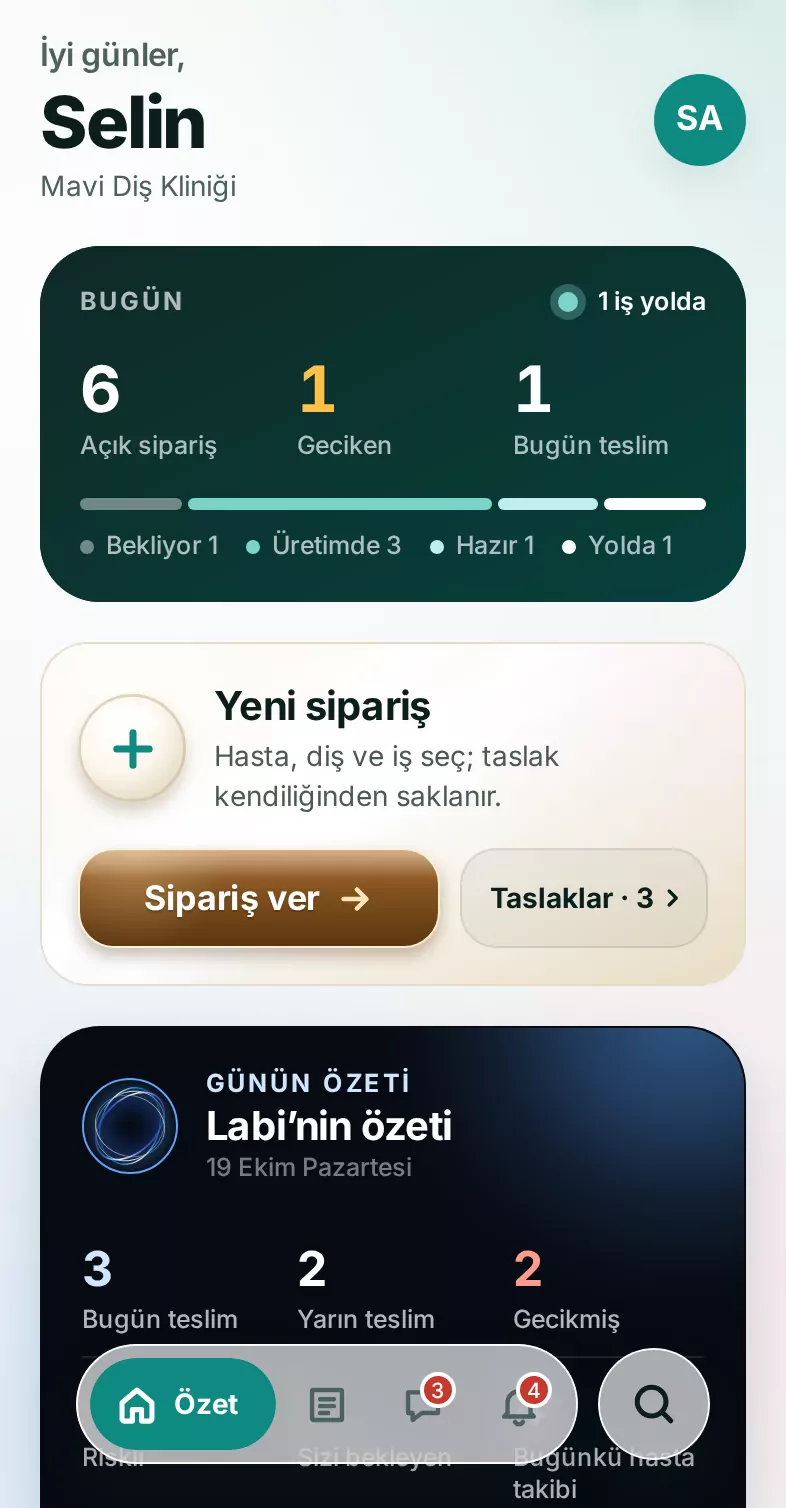
The dentist's home screen in the mobile app: open orders, overdue, due today and a new-order card

Product shown in Turkish; English interface coming soon.

Everyone sees their side of the same job.

  1. LabsEvery job from intake to invoice — stage by stage, and always whose hands it's in.
  2. Clinics & practicesEvery dentist's orders, approvals, statements and payments in one place.
  3. DentistsOrder by tapping a tooth, and see at a glance which stage every case is in.
  4. TechniciansTheir own queue, barcode scanning, earnings, leave and overtime.
  5. CouriersDeliveries, handover codes, offline delivery and expenses — in an app of their own.

Ordering

Tap a tooth. Your order is ready.

Dentists pick teeth on the chart and choose the work from the lab's own catalog, with the price shown as they go. Drafts save automatically.
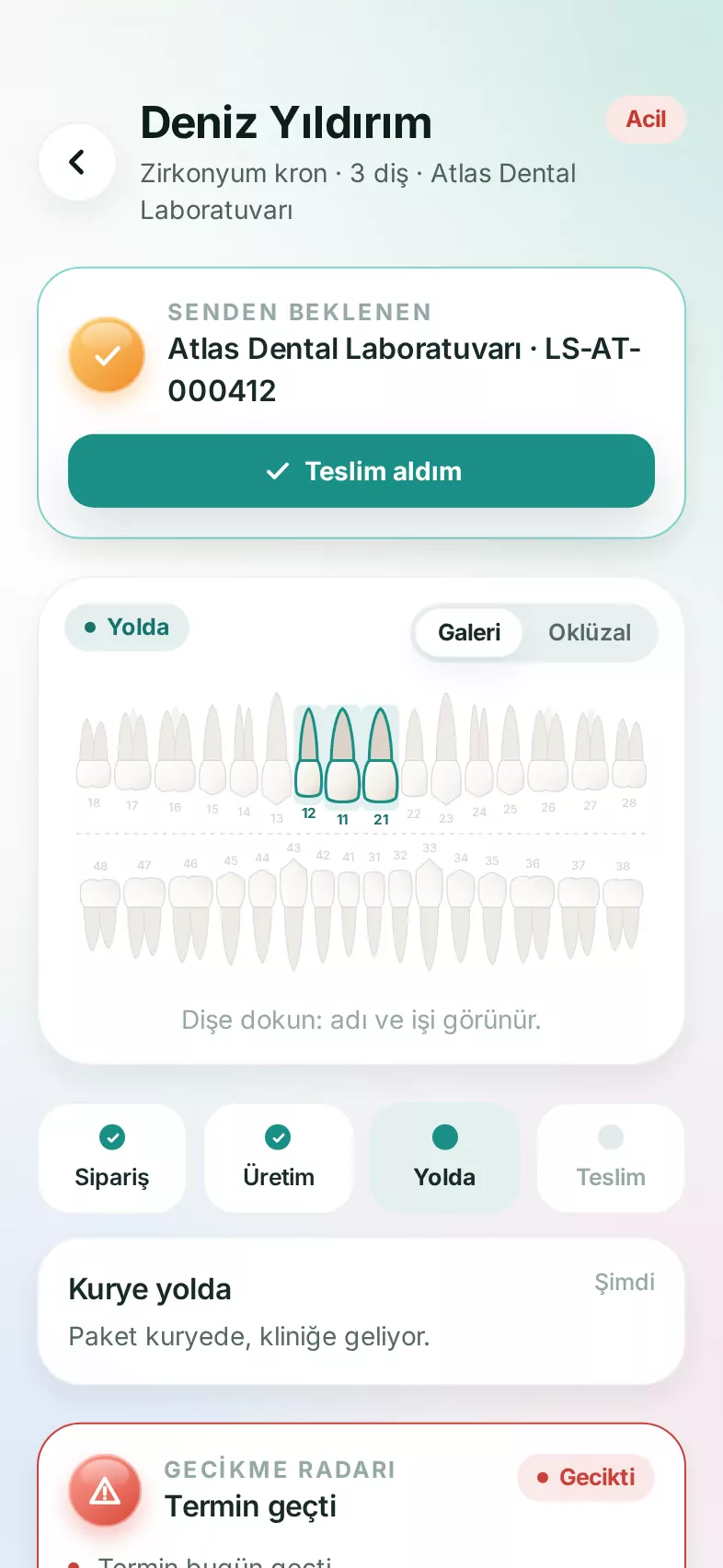
  • Digital tooth chartSingle teeth, bridges and full-arch work; occlusal view and tooth gallery.
  • Lab-specific catalogEach lab's own work types, materials, shade guides and prices.
  • Normal · Urgent · No rushThe dentist picks the turnaround; due date and price follow the lab's own rules.
  • “Import from my intraoral scanner”For digital impressions, the order waits for the scan and attaches it the moment it arrives.
  • ReorderStart again from a previous case, with every selection already filled in.
  • Treatment plans & patient quotesPick the work, hand the patient a PDF quote with your logo, and turn it into an order once it's accepted.
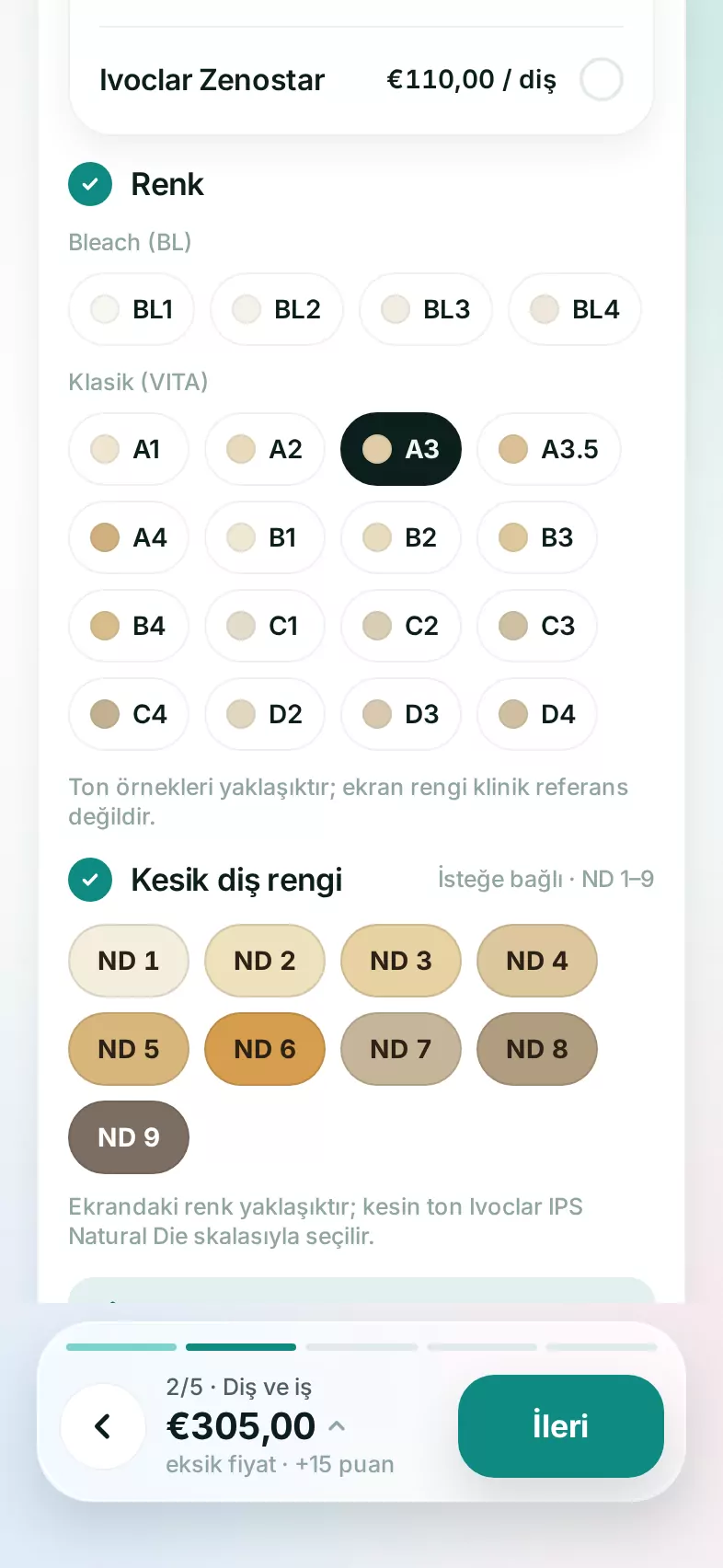
Shade selection in the order wizard: VITA classical shades and stump shade chips
Order details: the selected tooth on the occlusal chart, a stage timeline and delivery information

Scanner integration

Scan it. It's at the lab.

Intraoral scans land next to the order on their own. No exporting files, no email attachments, no USB sticks.

  • LabSync (Windows)Runs quietly in the background on the scanner PC, watching 3Shape, Medit, Sirona and generic export folders.
  • Matched by nameEach scan is attached to the patient's open order by first and last name. If there's more than one match, you choose.
  • Incoming scans inboxUnmatched scans wait in the inbox: link them to a patient, turn them into an order, or decline them.
  • iTero connector Coming soonCases sent to the lab's iTero account will land in the same inbox.

LabCad

See the case layer by layer.

Scan, gingiva, design and implant layers in a single scene. LabCad understands exocad exports and opens in one tap from the order or from Files — on the web and on your phone.
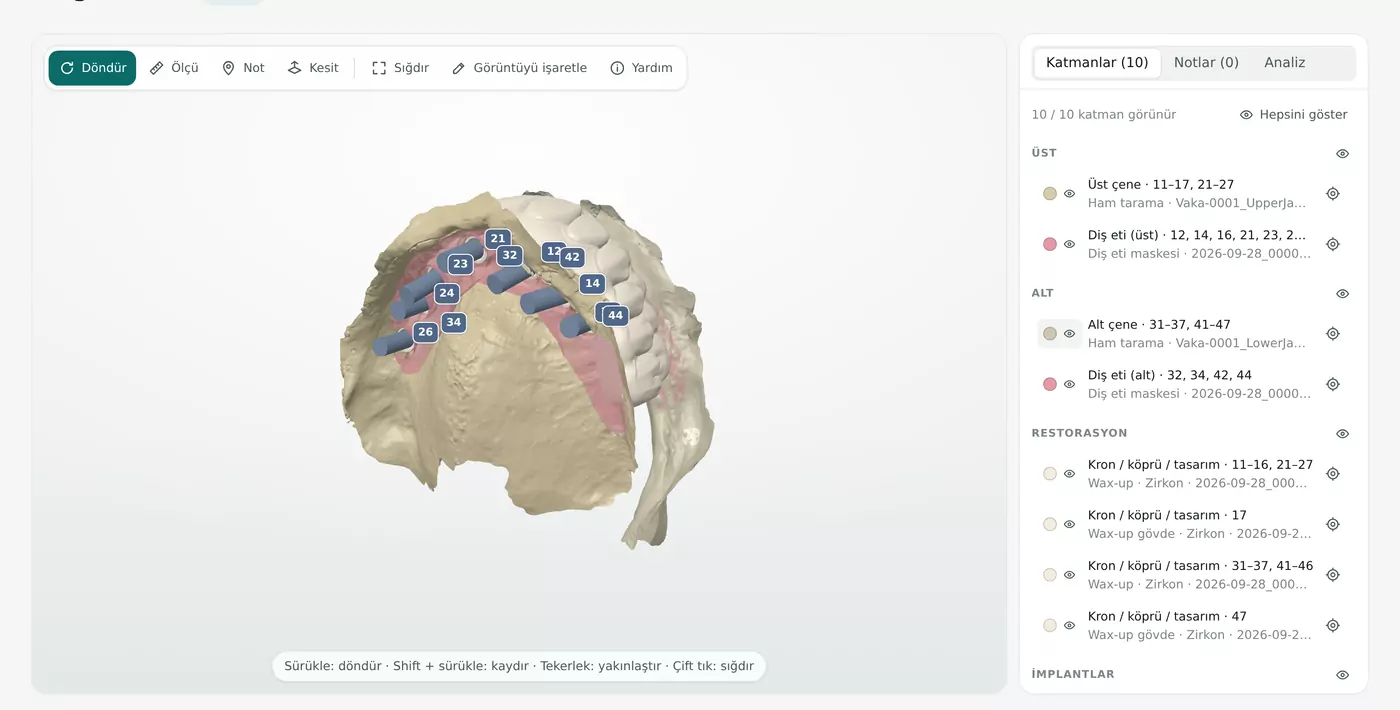
LabCad 3D view: upper and lower arch scans, gingiva masks, implant positions and the layer list
  • LayersShow or hide, opacity and color; upper, lower, restoration and implant groups.
  • exocad filesLayer names and tooth numbers are read straight from the export.
  • Sections & measuringSlice the model with a plane; measure between any two points.
  • Clearance mapThickness and occlusal clearance, shown in color.
  • CompareOverlay two versions of a design.
  • Implant markersImplant positions in the scene, labeled by tooth number.
  • 3D notesPin a note to the model; the other side is notified.
  • Open from FilesOpen a case straight from the patient folder, without going through the order.

Production

Every case on its own track.

Every stage from intake to delivery is a column. Who's working on what, what might slip, which days are full — one look at the board tells you.
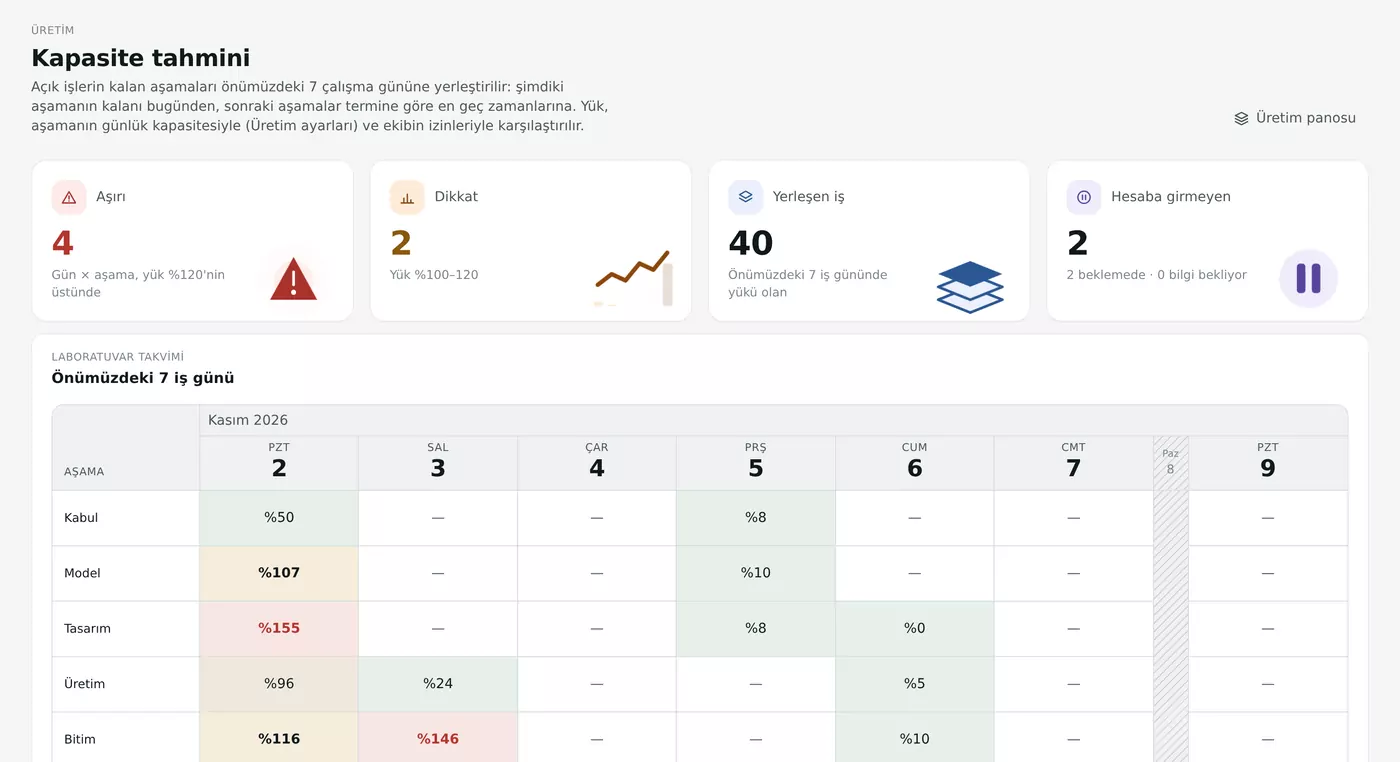
Capacity forecast: load by stage for the next 7 working days, as percentages
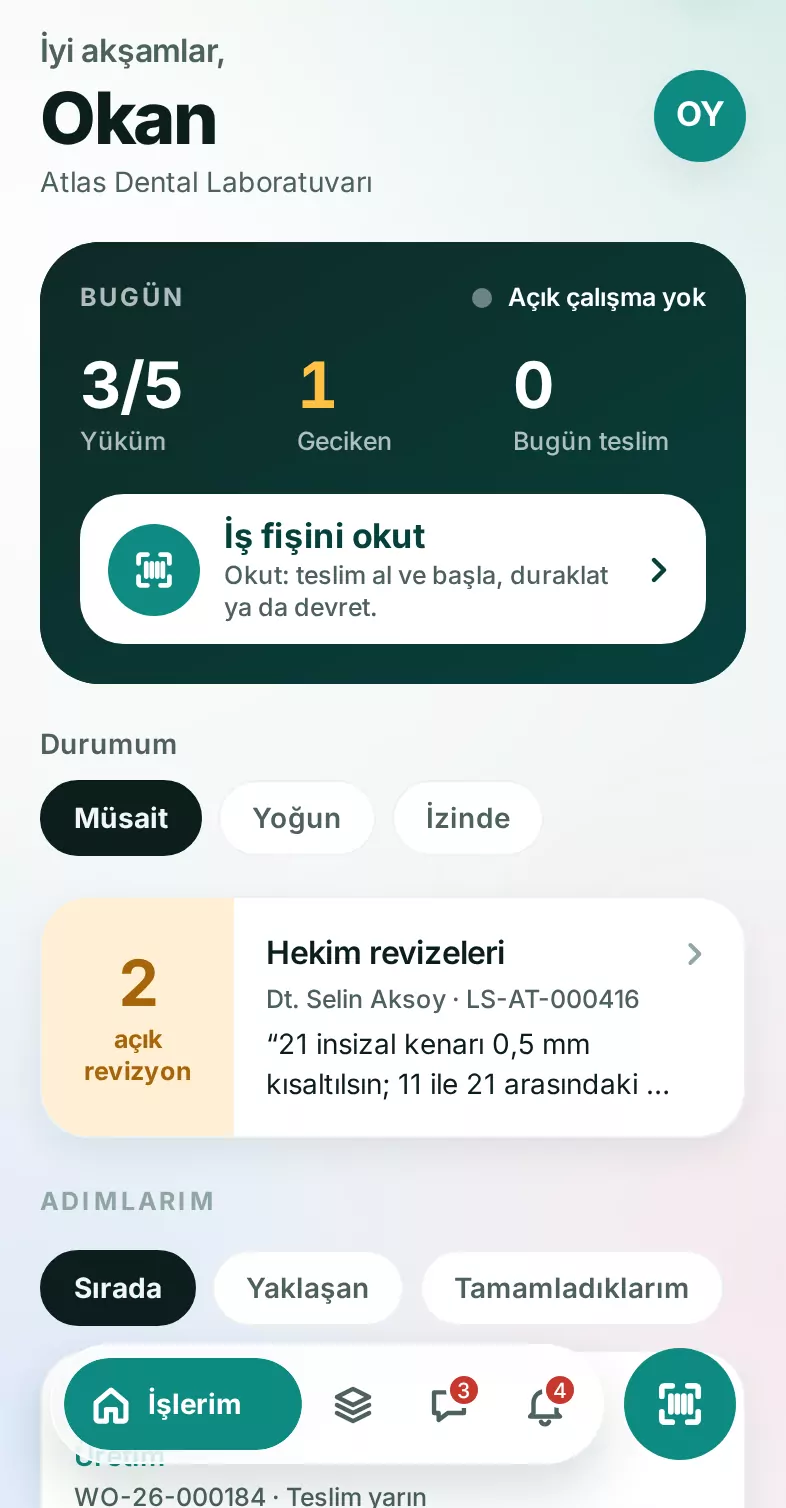
A technician's phone screen: daily load, a scan-job-ticket button and dentist revisions
  • Stage boardWork orders in stage columns, with urgent, at-risk and revision badges.
  • Technician queuesEveryone sees their own queue and what's up next.
  • Scan to workScan the barcode on the job ticket to pick up, start, pause or hand off a job.
  • Quality controlA dedicated stage before delivery, with everything awaiting inspection in one list.
  • Dentist design approval & revisionsDesigns go to the dentist; once approved, production moves on by itself.
  • Capacity forecastLoad by stage for the next 7 working days, laid out as a calendar.
  • Delay radarJobs at risk of missing their due date, flagged in the morning briefing and on the board.
  • Lab calendarWorking days, holidays and team leave are all taken into account.

Delivery

Everything on the road, in plain sight.

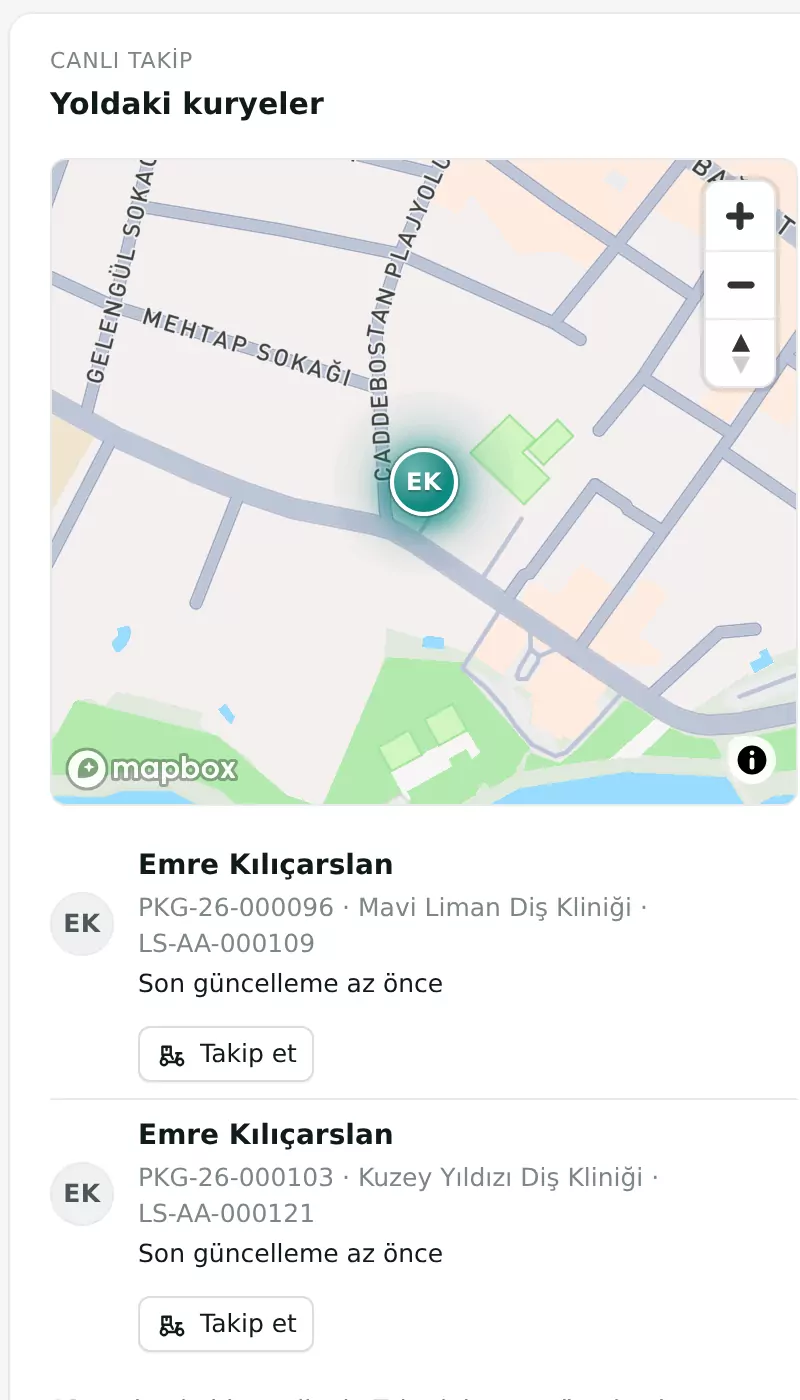
Finished work is packed by clinic, labeled and handed to a courier or a shipping carrier. Dentists see where the courier is and when it will arrive.
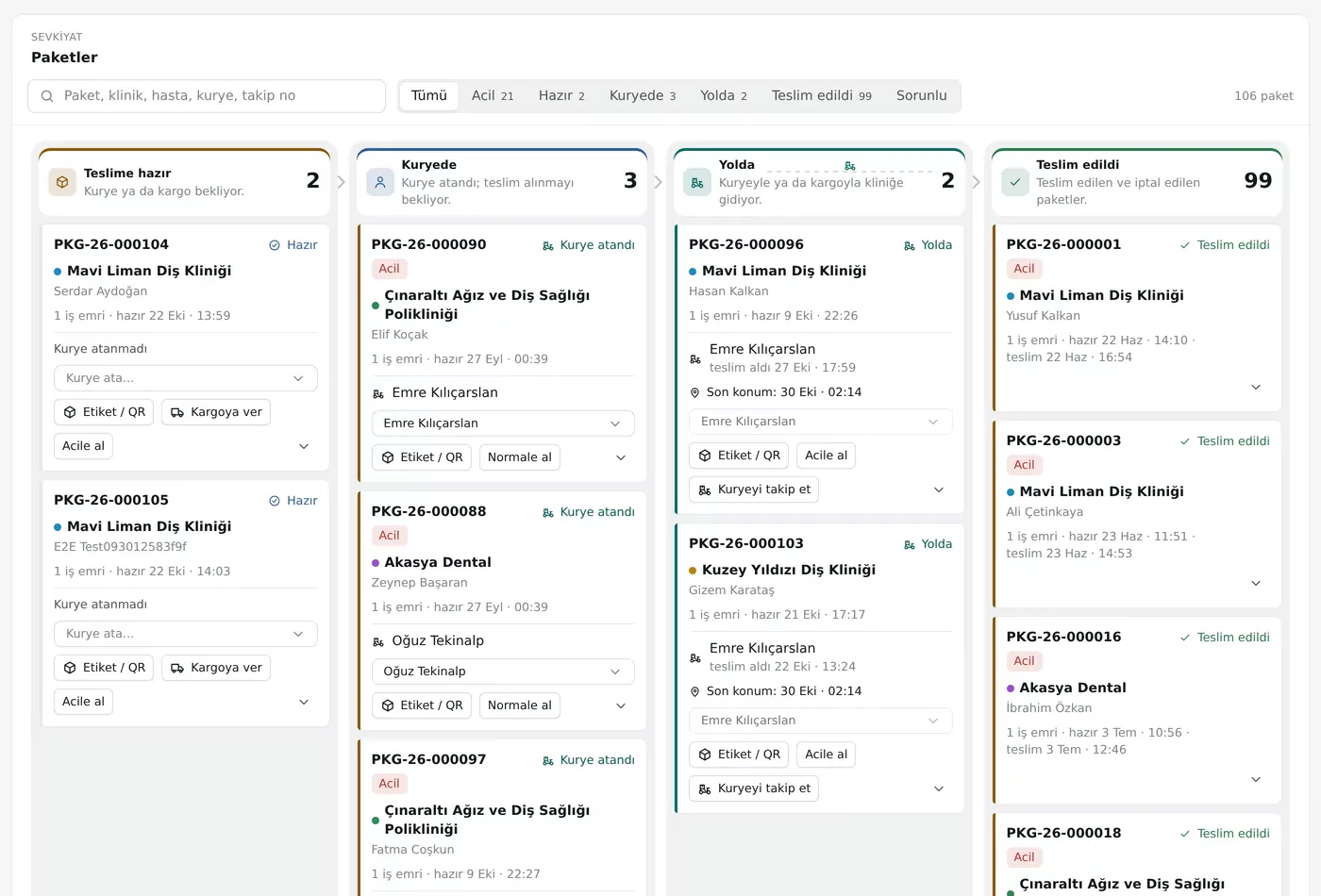
Shipping board: packages in ready, with courier, on the way and delivered columns
Live tracking: the courier and packages on the map
  • LabSoft CourierThe courier's own app: the day's deliveries, impression pickups and handovers.
  • Live mapThe lab and the dentist follow the courier on the map.
  • Route & arrival timeEstimated arrival, worked out from the courier's route and live traffic.
  • QR & code handoverPackages are scanned at pickup; on delivery, the clinic confirms with a 6-digit code.
  • Offline deliveryNo signal? The handover waits on the phone and goes through once the connection is back; photo optional.
  • Courier expensesFuel, parking, tolls — logged with the receipt and approved by the lab.
  • ShippingSend by carrier; thermal, A4 and A5 labels.

Billing

Part of the flow.

Delivered work drops straight into billing. Pro forma, clinic approval, invoice, payment and account balance are all connected.
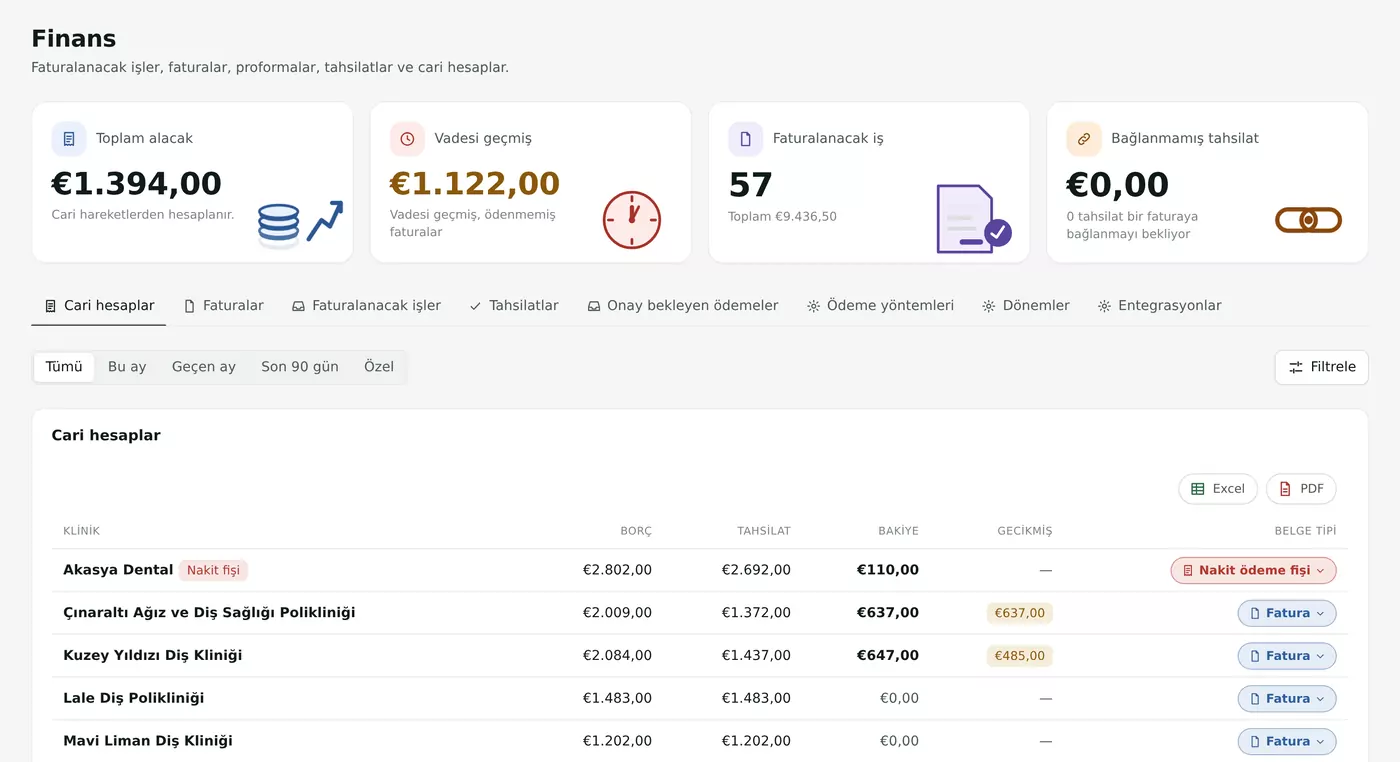
  • Customer accountsCharges, payments, balances and overdue amounts, clinic by clinic.
  • Pro forma & invoiceThe clinic approves or disputes the pro forma; then the invoice is issued.
  • PaymentsPayments are recorded and matched to invoices.
  • Cash receiptsReceipts for accounts that aren't invoiced.
  • Custom pricingPrices for a specific dentist or clinic; otherwise the standard list applies.
  • Loyalty pointsDentists earn points on delivery and spend them in the rewards store or toward an order.
  • Special-day discountsBirthdays, Dentists' Day (22 February) and the lab's own dates, suggested right on the invoice.
  • Excel & PDFEvery table exports to Excel and to a PDF with your logo.
Billing: total receivables, overdue amount and a table of accounts by clinic

Team

Every effort, accounted for.

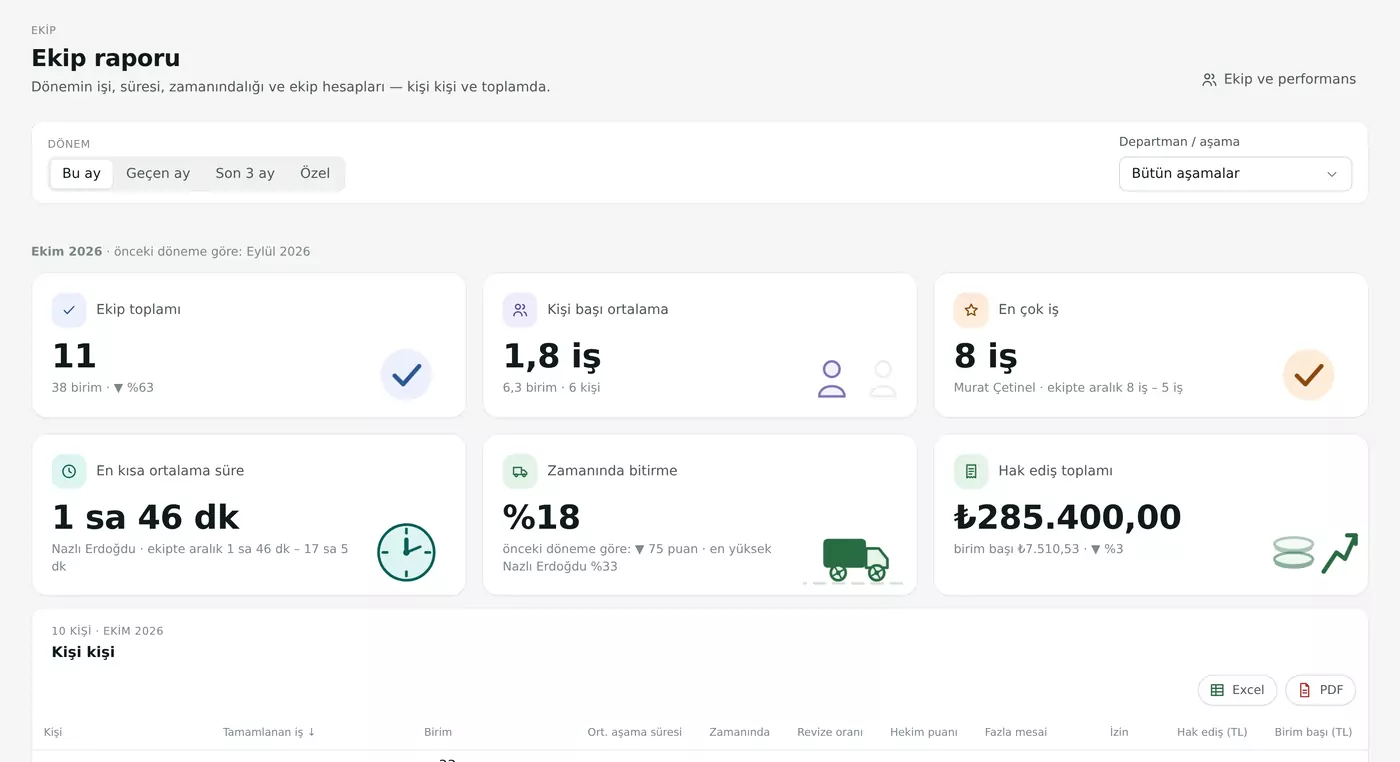
Who finished how much work, how fast, and how often on time — and what they've earned. Person by person, period by period.
  • Team & performanceJobs, turnaround and on-time rate by department and stage.
  • Team reportA period's work and earnings in one table; Excel and PDF.
  • Pay & earningsAn earnings ledger that can be hidden person by person.
  • Leave & overtimeRequested from the phone, approved by a manager; leave feeds into the capacity forecast.
  • ReviewsDentists rate delivered work out of 5 stars; the results are visible to lab management.
Team report: team total, average per person, on-time rate and total earnings

Clinics & dentists

Simple for dentists. Complete for clinics.

Dentists see their own orders; clinic management sees the whole clinic. Conversations with the lab, approvals and accounts all live in one place.
  • Their own ordersDentists see only their own cases; authorized staff see the whole clinic.
  • ApprovalsInformation requests, design approvals and delivery confirmations in one list.
  • Account & statementsInvoices, payments and balance — on the screen of whoever pays.
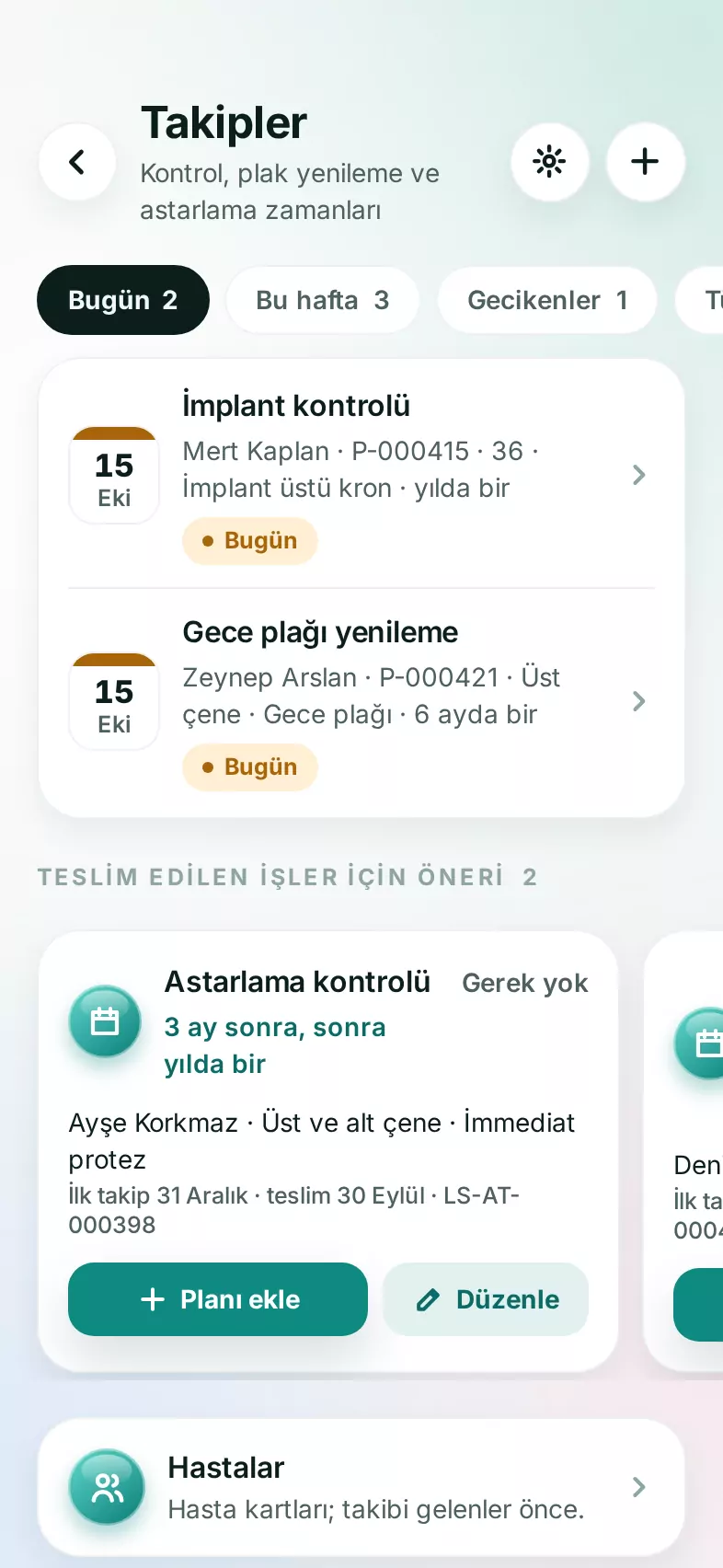
  • Patient follow-ups & remindersCheck-ups, night guard renewals, relines — with a notification when they're due.
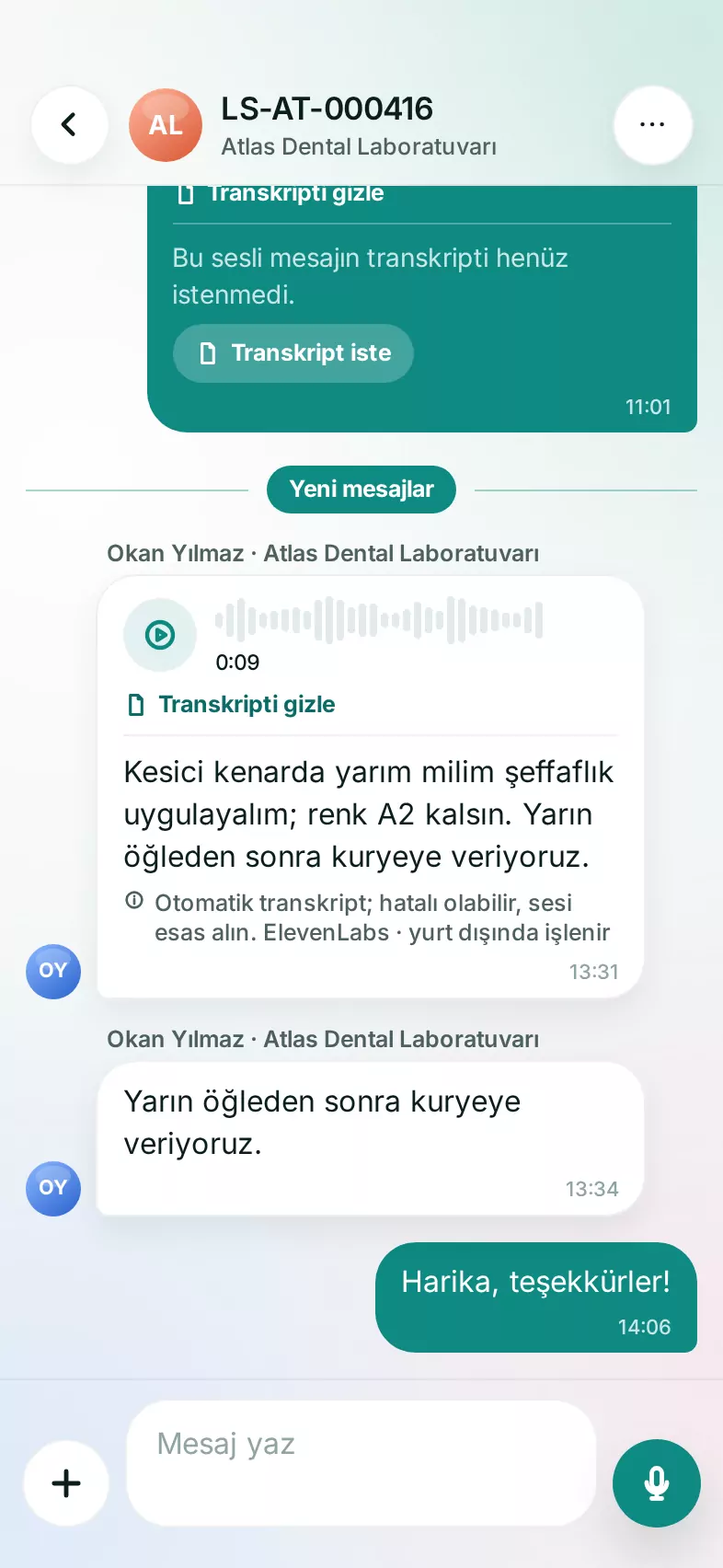
  • MessagingOrder conversations, files, voice messages and their transcripts.
  • “Looking for a lab”Post a request and labs in your area reply with a price and turnaround — free of charge.
Patient follow-ups: check-ups due today and this week, with suggestions for delivered work
Order conversation: a voice message, its automatic transcript and replies

AI

Intelligence, built in.

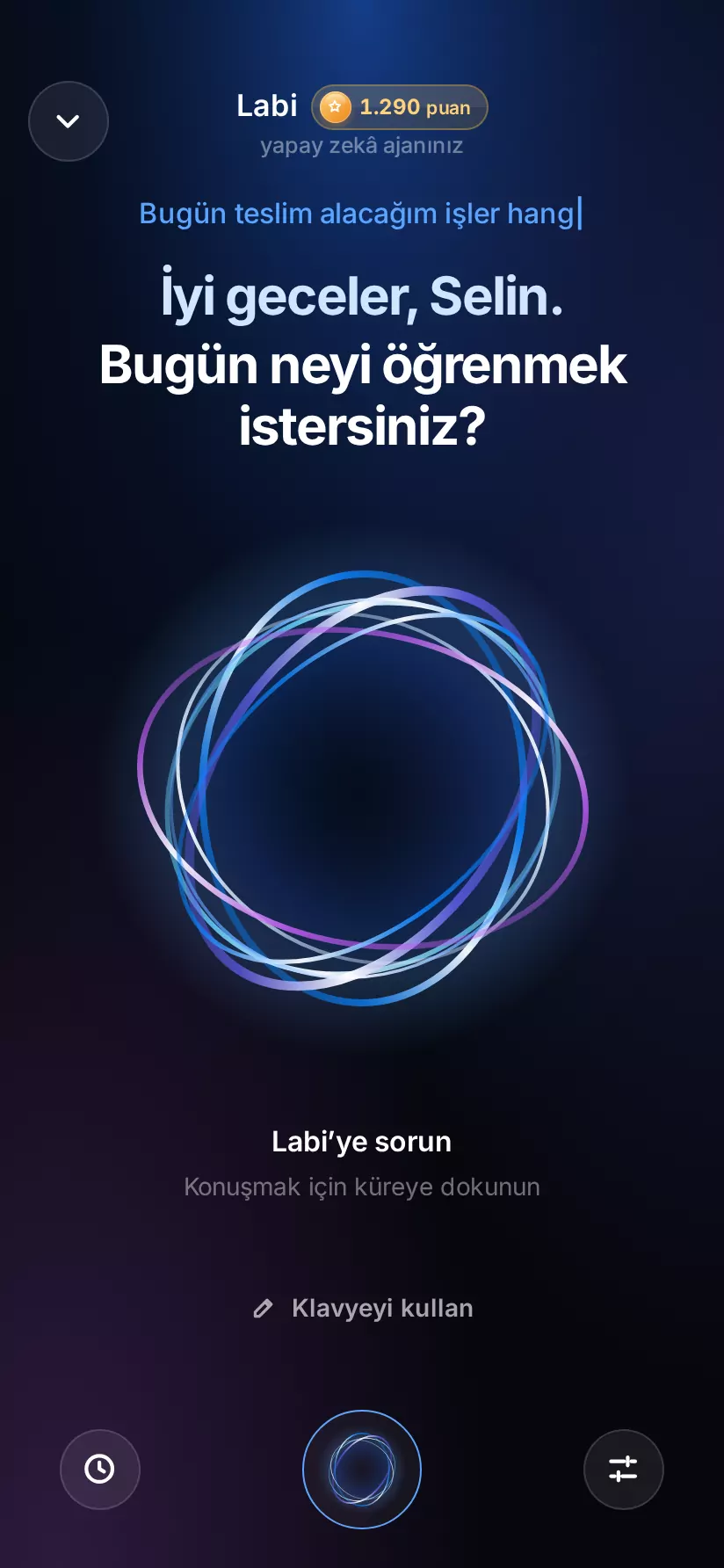
Labi and Labla are two assistants that speak Turkish. Ask by typing or by voice — where a job is, this month's summary, what's running late today — and they answer from your own data.
  • From your own dataAnswers come from your orders and records in the system.
  • Within your permissionsThe assistant sees only what you're allowed to see.
  • Morning briefingWhat's due today, overdue, at risk or awaiting approval.
  • Voice order draftsSay it and a draft is prepared; the final call is yours.
  • Approval cardsThe assistant suggests an action; nothing changes until you approve it.
Labi's voice mode: an orb made of ribbons of light, asking what you'd like to know today

Mobile

Your work, always within reach.

Two native apps: LabSoft for everyone except couriers, and LabSoft Courier for couriers. iPhone first; App Store and Google Play releases coming soon.

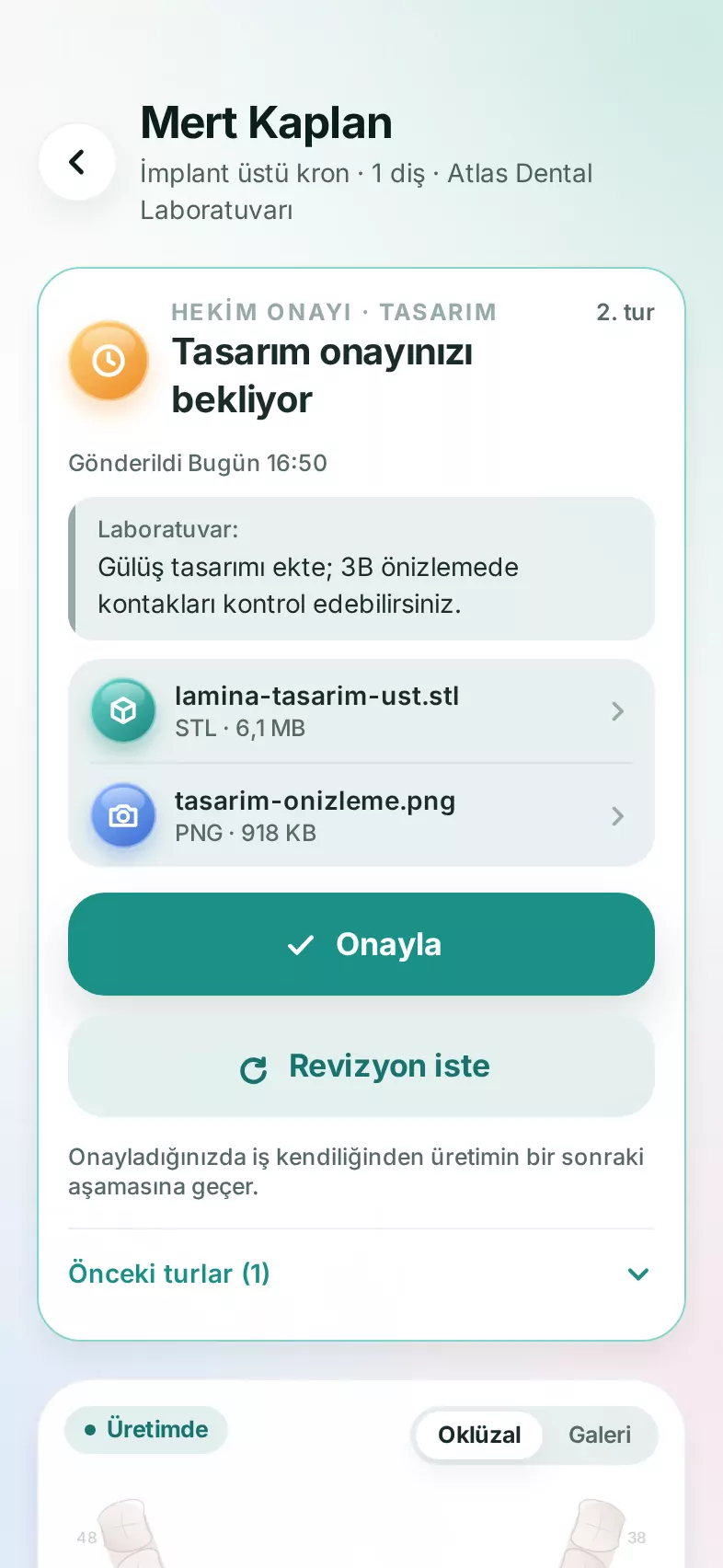
Design approval on the dentist's phone: the lab's note, files, and Approve and Request revision buttons

LabSoft

For dentists, labs, clinics, practices, stockrooms and front desks. Orders, approvals, messages, files, LabCad and Labi & Labla — on the same account as the web.
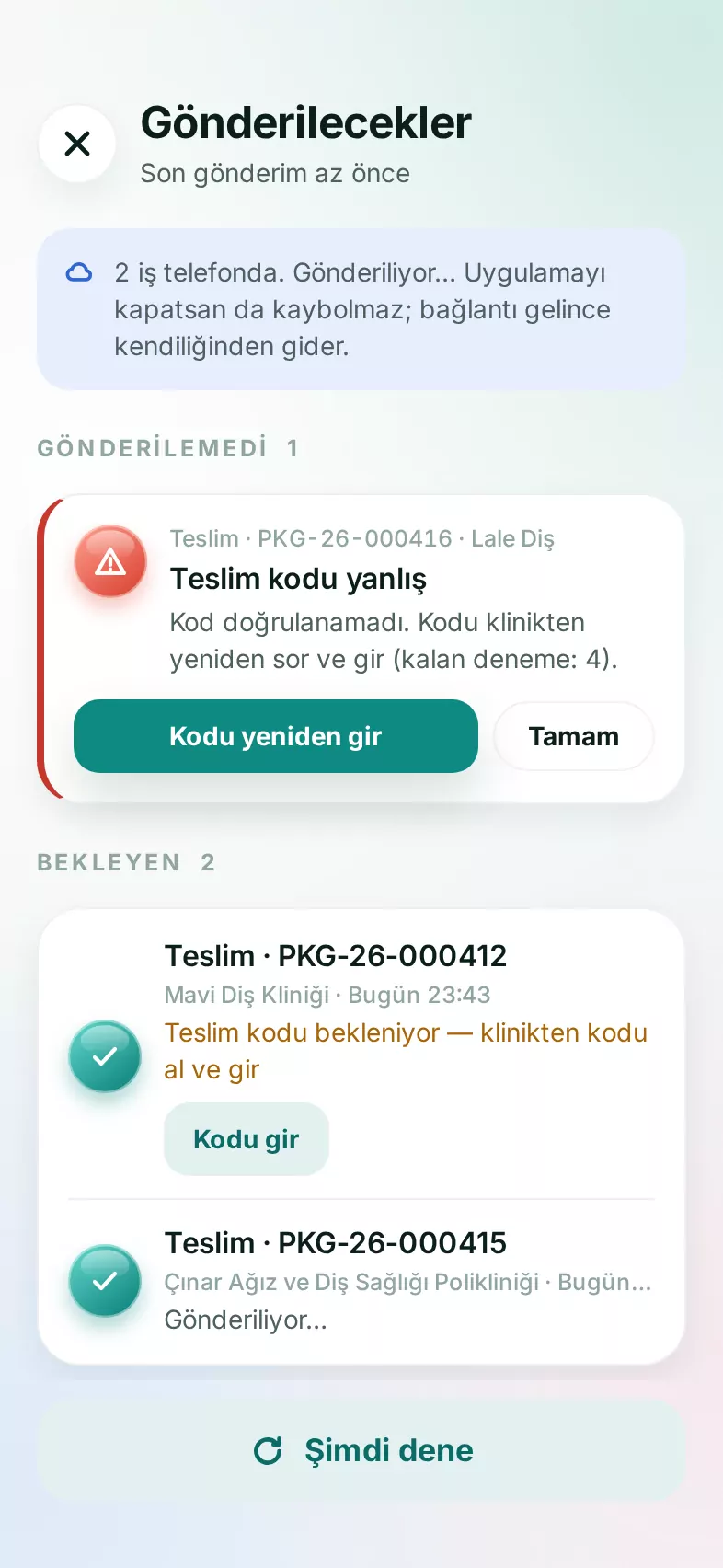
Courier app: offline queue of handovers waiting to be sent and a handover code notice
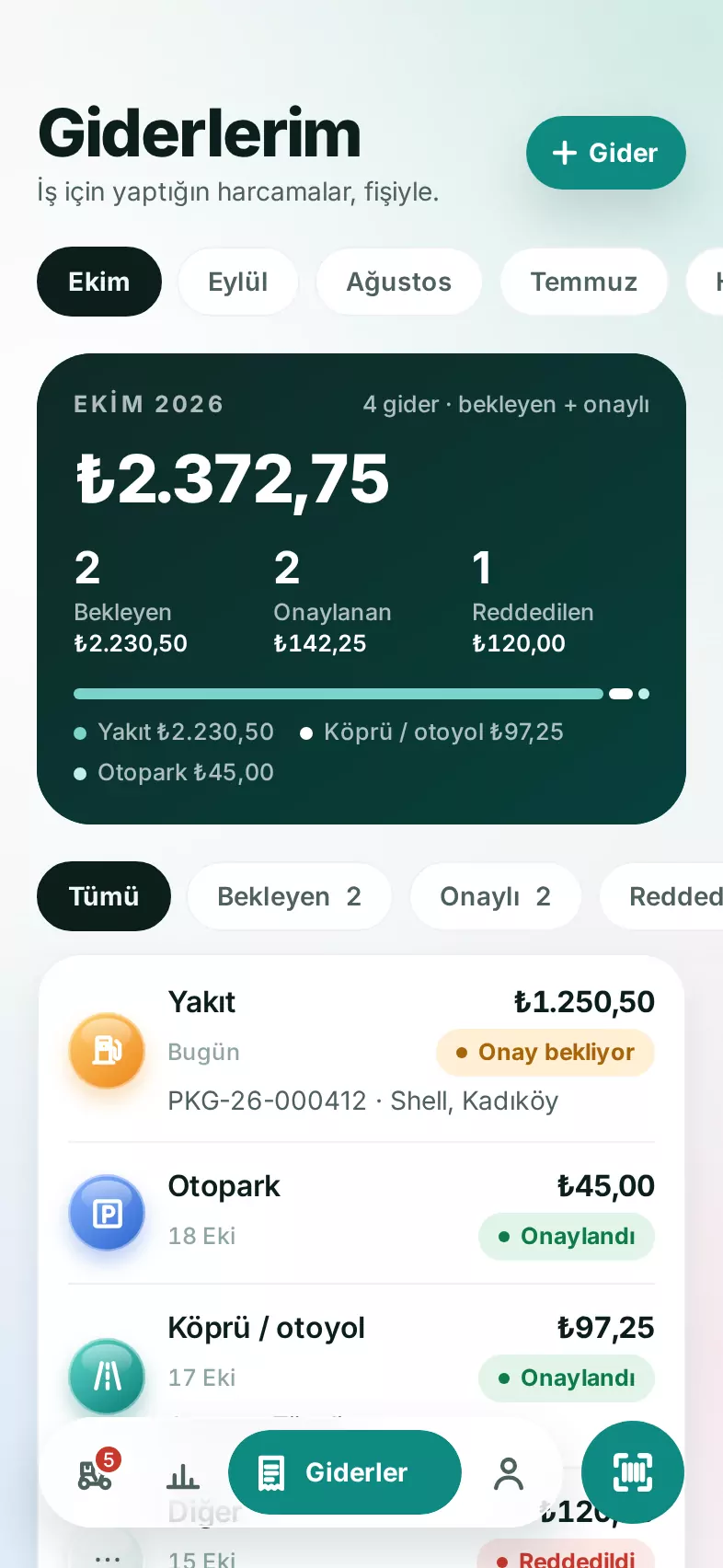
Courier app: monthly expenses, with receipts awaiting approval and approved

LabSoft Courier

The day's deliveries, map and directions, swipe to deliver, QR and handover codes, an offline queue and expenses.

Security & privacy

Your data. Only yours.

In a system that holds patient data, trust isn't a feature — it's the foundation. The rules live in the database, not just the interface.

  • Organization isolationEvery organization sees only its own data, enforced row by row in the database.
  • Two-factor authenticationAuthenticator app and recovery codes.
  • Audit logKey actions are recorded with who did them and when.
  • Virus scanningEvery uploaded file is scanned for viruses.
  • Encrypted backupsEncrypted backups every night, and a restore drill every week.
  • Name maskingLabs can choose to mask patient and dentist names on screen.
  • Hosted in TürkiyeData and files are stored on servers in Türkiye.
  • Independent penetration testTo be carried out by an independent team before launch.

Getting started

Up and running on day one.

Lab setup happens in the browser — no servers to run, no software to install.

  1. 01Setup wizardGreets you on first sign-in: organization details, team and email in a few steps.
  2. 02Guided tourA step-by-step walk through the screens, ending with a short intro film.
  3. 03First orderInvite your dentists and watch orders start landing on your board.

And more

  • Stock & run-out forecast
  • Product passport (QR)
  • Weekly management report
  • Dentist churn alerts
  • Announcements
  • Web & mobile notifications
  • Personal email inbox
  • Files & patient folders

FAQ

Questions, answered.

Who is LabSoft for?

Dental labs and the clinics, practices and dentists they work with. The lab's technicians and couriers use the same system, each with screens of their own.

Do I need to install anything?

No. LabSoft runs in the browser, and a setup wizard greets you on first sign-in. Only the phone apps — and, for scan import, LabSync on the scanner PC — are installed separately.

Can I use it as a dentist without a lab?

Yes. You can sign up without being linked to a lab and post a “Looking for a lab” request. Participating labs in your area reply with a price and turnaround time; requests and offers are free.

Which intraoral scanners does it work with?

LabSync watches 3Shape, Medit, Sirona and generic export folders, and attaches each scan to the open order by the patient's first and last name. An iTero connector is coming soon.

Can I view my exocad designs?

Yes. LabCad opens the STL / PLY files in an exocad export as layers, reading layer names and tooth numbers from the export. Section, measurement, clearance map and comparison tools are built in.

Where is my data stored?

On servers in Türkiye, with encrypted backups every night. When you use Labi and Labla, the information needed to answer your question is sent to our AI service provider. The details are in our KVKK privacy notice (KVKK is Türkiye's personal data protection law; the notice is in Turkish).

Can I hide patient and dentist names?

Yes. Lab owners and managers can mask patient names, and dentist, clinic and practice names, separately in settings.

Is there a mobile app?

Yes: LabSoft for everyone except couriers, and LabSoft Courier for couriers. iPhone comes first; App Store and Google Play releases are coming soon.

How is it priced?

Pricing isn't public yet. We share it on the demo call, based on the size of your lab.

How do I get a demo?

Email us at the address below — just tell us a little about your lab and the size of your team.

Demo & contact

Let's set up your lab together.

Write to us for a demo, with questions or about partnerships. Pricing is shared on the demo call.

iletisim@labsoft.com.tr
Email us